
Quién puede ver qué: roles y permisos para una empresa de servicios en expansión
El día en que tu equipo supere la etapa de «todo el mundo puede verlo todo»... y por qué los permisos reales necesitan un servidor.
Actualizado 18 de julio de 2026
El día en que tu equipo supere la etapa de «todo el mundo puede verlo todo»... y por qué los permisos reales necesitan un servidor.
Publicado en julio de 2026.
La respuesta breve
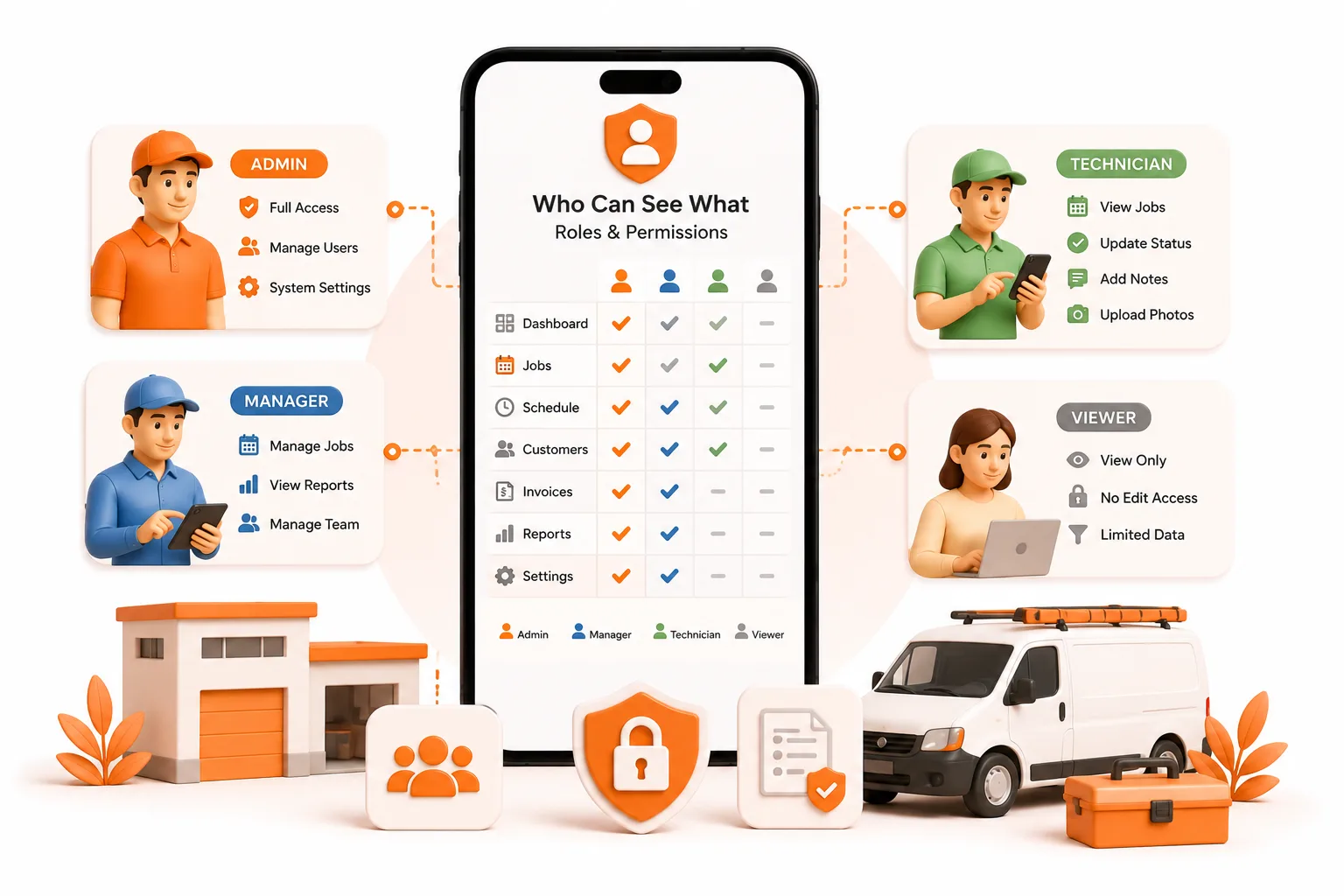
En cuanto tienes personal, alguien tiene que decidir quién puede ver los precios y los márgenes, quién puede modificar un trabajo, quién puede ver toda la cartera de clientes y quién mantiene el acceso tras dejar la empresa. De eso se tratan los roles y los permisos. Los permisos reales no pueden aplicarse en un dispositivo que controla el usuario: necesitan un servidor que compruebe cada acción contrastándola con una identidad. ToolBerry Free no cuenta con roles controlados por un servidor, por diseño. Está pensado para un solo operador o para un pequeño equipo que comparte un espacio de trabajo a través de un almacenamiento compartido, donde todos ven todo. Los roles y permisos ya están disponibles en ToolBerry Pro, incluidos los roles personalizados que tú mismo defines en lugar de seleccionarlos de una lista fija.
El día en que los permisos empiezan a importar
Renata pasó cuatro años limpiando casas ella sola antes de empezar a contratar personal. No hizo falta mucho para que todo cambiara: una segunda limpiadora, una tercera, su prima encargándose de los horarios y las llamadas, y una trabajadora a tiempo parcial para las semanas de más trabajo. Cinco personas… y la aplicación que había sido perfecta para una sola persona se convirtió de repente en un problema.
Cuando solo era ella, lo importante era tener todo el negocio en un solo teléfono. Con cinco personas, esa misma configuración significaba que:
- La empleada de limpieza más nueva puede ver exactamente lo que paga cada cliente -y le dijo a uno que le parecía que el precio era elevado-.
- Su prima borró a un cliente con cuatro años de notas y códigos de la caja de seguridad, pensando que era un duplicado.
- Una empleada a tiempo parcial de fin de semana tiene la dirección y el código de la verja de cada cliente en su teléfono personal, y además trabaja como limpiadora para otras dos empresas.
- La empleada de limpieza que dimitió en marzo todavía tiene la aplicación instalada, con toda la agenda en ella.
Nada de esto se debe a que Renata contratara mal. Es que, en algún punto entre dos y cinco personas, «todo el mundo puede verlo todo» dejó de ser una configuración predeterminada razonable, y nada en su software lo detectó.
Esta es la parte que más sorprende a la mayoría de los propietarios: los roles no se convierten en un problema real cuando se llega a los cincuenta empleados, ni siquiera a los veinte. Empiezan a ser importantes a partir de unos cuatro o cinco -en el momento en que las personas que utilizan la aplicación ya no son solo tú y alguien a quien le darías tu tarjeta bancaria-. Lo que está en juego sigue aumentando a medida que creces, pero la línea que cruzas se alcanza pronto.
Qué significan realmente los roles y los permisos
Hay dos palabras que se utilizan indistintamente y no deberían:
- La autenticación consiste en demostrar quién eres. La puerta principal. Un inicio de sesión.
- La autorización es lo que se te permite hacer una vez que estás dentro. A qué habitaciones puedes entrar y qué puedes tocar en ellas.
Un rol agrupa la autorización en algo que una persona pueda entender: técnico, despachador, estimador, responsable de oficina, propietario. Los permisos subyacentes pueden ser generales (¿puedes abrir facturas en general?) o específicos (¿puedes ver la columna de costes en la factura que se te permite abrir?).
Se necesitan ambos. Un inicio de sesión sin autorización subyacente solo significa que todo el mundo está identificado, pero sigue viendo todo.
Las cuatro preguntas que toda empresa en crecimiento debe responder
- ¿Quién puede ver el dinero? Precios, márgenes, lo que se cobra, lo que se paga. Esta suele ser la primera línea que los propietarios quieren trazar.
- ¿Quién puede modificar los registros? Editar y eliminar trabajos, clientes e historial, y si queda algún rastro de quién lo ha hecho.
- ¿Quién puede ver todo el libro? La lista completa de clientes o solo la ruta de hoy. Esta es la pregunta que más importa el día que alguien se marcha a la competencia.
- ¿Qué ocurre cuando alguien se marcha? El acceso debe poder revocarse desde un punto central, de forma inmediata, sin necesidad de recoger el teléfono.
Vale la pena decirlo claramente: no se trata de dar por sentado que tu personal son ladrones. La mayoría de los incidentes internos son simples errores. El estudio «2025 Cost of Insider Risks» del Ponemon Institute reveló que los empleados negligentes eran la causa principal del 53 % de los incidentes internos, frente al 27 % que se debieron a actos maliciosos. Los permisos protegen principalmente a las personas de buena fe de accidentes costosos, y te protegen a ti de esa única salida indeseada que no viste venir.
Por qué los permisos necesitan realmente un backend
Esta es la parte que la mayoría del marketing de software omite.
En un dispositivo de tu propiedad, tú controlas todo lo que hay en él. Una aplicación que solo funciona de forma local puede ocultar la columna de costes -desactivarla, dejarla fuera de la pantalla-, pero los datos siguen estando en ese dispositivo, y la comprobación que los oculta se ejecuta en el hardware que controla el usuario. Cualquiera lo suficientemente decidido puede sortearla. Un campo oculto es una cortina, no un muro.
La aplicación real de las restricciones debe residir en un lugar al que el usuario no pueda acceder: un servidor que almacene la identidad y compruebe cada solicitud en función de ella. La pregunta «¿Tiene esta persona permiso para ver los márgenes?» debe ser respondida por una máquina que tú controles, no por la que lleva en el bolsillo. Eso es un límite de confianza, no una opción de configuración, y es la razón por la que la autenticación y los permisos no pueden realizarse únicamente sin conexión.
La revocación lo deja claro. No se puede «deshacer el envío» de datos que ya están en el teléfono de alguien. Retirar el acceso requiere un guardián que haya estado presente en todo momento.
La situación actual de ToolBerry -con toda sinceridad-
ToolBerry Free no tiene roles impuestos por el servidor, y no vamos a fingir lo contrario. La versión Free está diseñada para un único usuario o para un pequeño equipo que comparta un espacio de trabajo a través de un almacenamiento compartido y cuyos miembros confíen plenamente entre sí. Quien tenga el dispositivo, tiene los datos. No es una carencia que ocultemos: es una consecuencia directa de la misma arquitectura que hace que la versión Free sea gratuita, sin conexión y sin necesidad de cuenta. Para una sola persona y un camión, es la solución perfecta.
Los roles y permisos están disponibles en ToolBerry Pro -incluidos los roles personalizados que tú mismo nombras y configuras-, en lugar de encasillar a tu equipo en una lista fija de «Administrador / Usuario». Una empresa de control de plagas, una empresa de limpieza y un taller de fontanería no realizan el mismo trabajo, por lo que no deberían verse obligados a encajar en los mismos tres roles. Los permisos son una de las funciones que, de todos modos, requieren un backend: la misma línea que separa la versión Free de la Pro en cuanto a sincronización, reservas, pagos y notificaciones. (Esa explicación la encontrarás en «Free vs Pro»).
Si diriges un equipo de verdad, ponte en contacto con nosotros: podemos ayudarte a configurar roles que se adapten al funcionamiento real de tu negocio.
Qué debes tener en cuenta al evaluar cualquier aplicación
Seis preguntas que vale la pena plantear en una demostración, independientemente de a quién se lo compres:
- ¿La restricción se aplica en el servidor? Pregunta directamente: «Si un técnico accede a la parte interna de la aplicación desde su propio teléfono, ¿puede ver los costes?». Si la ocultación solo se produce dentro de la aplicación, es meramente cosmética.
- ¿Se corresponden los roles con una profesión? «Administrador» y «Usuario» no son un modelo de roles adecuado. Técnico, despachador, presupuestador, personal de oficina y propietario sí lo son.
- ¿Se pueden controlar los campos, y no solo las pantallas? Permitir que alguien abra un trabajo sin ver el margen es la necesidad real más común.
- ¿Existe un registro de auditoría? ¿Quién cambió el precio y cuándo? Sin él, los permisos son solo la mitad del sistema.
- ¿Se puede dar de baja a un usuario con una sola acción? Revocación centralizada, en todas partes, sin tener que ir tras el dispositivo.
- ¿Sigue funcionando la aplicación de campo sin conexión con un rol restringido? Los permisos no deberían restarte la fiabilidad por la que compraste la aplicación.
Las compensaciones reales
Los roles suponen una carga adicional. Alguien tiene que hacerse cargo del modelo de permisos y mantenerlo actualizado a medida que se incorporan y se mueven los usuarios. Eso es un trabajo de verdad, y un equipo de dos personas que confían plenamente la una en la otra aún no lo necesita, pero el punto de inflexión llega con la cuarta o quinta persona, no con la cuadragésima.
Si es demasiado detallado, nadie lo mantiene. Empieza con tres roles, no con once. Un modelo de permisos que nadie actualiza es peor que no tener ninguno, porque confiarás en él cuando no deberías.
El modo sin conexión y los permisos entran en conflicto de verdad. Los permisos almacenados en caché pueden quedar obsoletos; no se puede revocar en tiempo real un dispositivo desconectado. Cualquier proveedor honesto describirá las desventajas en este aspecto en lugar de afirmar que está resuelto.
¿Tienes alguna pregunta?
Nos gustaría mucho recibir opiniones de personas que dirigen equipos reales. ¿Cuáles son los tres roles en tu empresa y qué es lo único que nunca dejarías que viera un usuario de campo? Cuéntanoslo en contact@toolberry.net.
ToolBerry Free: gratis para siempre para operadores individuales. Pro: para equipos que necesitan sincronización en tiempo real y roles gestionados por el servidor.
Para los curiosos en materia técnica
La regla que rige todo esto es antigua y poco glamurosa: nunca confíes en el cliente.
Cualquier decisión de autorización que se ejecute en el dispositivo del usuario es meramente orientativa. Son ellos quienes controlan el proceso, el almacenamiento y la pila de red. Puedes ofuscarla y aumentar la dificultad, pero no puedes convertirla en una garantía. Por lo tanto, el límite debe estar en el lado del servidor: cada solicitud llega con una identidad (un token o una sesión), el servidor evalúa la política en función de esa identidad y devuelve solo lo que permite el rol.
Lo que nos lleva a la regla que realmente importa: filtra en el origen, no te escondas en la interfaz de usuario. Si el dispositivo de un técnico recibe toda la agenda de clientes y la aplicación simplemente se niega a mostrarla, no has creado un permiso, sino una sugerencia almacenada en el almacenamiento local.
Eso es lo que hace que el modo sin conexión más el RBAC sea realmente complicado, y merece la pena ser preciso sobre el porqué:
- Permisos obsoletos. Un dispositivo que lleva dos días sin conexión sigue aplicando un rol que quizá hayas modificado ayer.
- Retraso en la revocación. No puedes acceder a un dispositivo desconectado para retirarle el acceso. Lo máximo que puedes hacer es caducar las credenciales almacenadas en caché y rechazar la sincronización.
- Escrituras no fiables. El trabajo creado sin conexión no puede darse por válido tal cual al llegar. Cada escritura en cola debe revalidarse en el servidor en el momento de la sincronización, comparándola con lo que ese rol tenía permitido hacer; la palabra del dispositivo no es prueba suficiente.
La medida que resuelve la mayor parte de esto en un sistema que da prioridad a lo local es delimitar qué es lo que se sincroniza. En lugar de enviar el conjunto de datos completo a cada dispositivo y ocultar partes del mismo, un rol determina lo que un dispositivo recibe en cada momento: el teléfono de un técnico contiene la ruta de hoy y esos clientes, no nueve años de toda la agenda. El permiso más sólido no es una comprobación. Son los datos que nunca llegaron al dispositivo en primer lugar.
Así es como hemos configurado ToolBerry Pro: las lecturas «local-first» siguen siendo rápidas para todo lo que un rol está autorizado a contener, la sincronización se limita por rol y cada escritura se valida en el servidor en el momento de su entrada. La arquitectura subyacente es la misma que se describe en «Por qué ToolBerry es “offline-first”», con un servidor añadido exactamente donde la confianza lo requiere.
Más información
- Versión gratuita frente a Pro: la historia de ToolBerry y para qué sirve cada plan -dónde encajan los roles en el panorama general
- «Por qué ToolBerry da prioridad al modo sin conexión»: la arquitectura subyacente
- Lo que realmente necesita toda aplicación de servicios de campo (y lo que es solo lastre): cuándo una función se gana su lugar
- ¿Es ToolBerry realmente gratis para siempre? - Por qué la versión gratuita sigue siendo gratuita