
Gate codes in old texts. Customers lost in your phone.
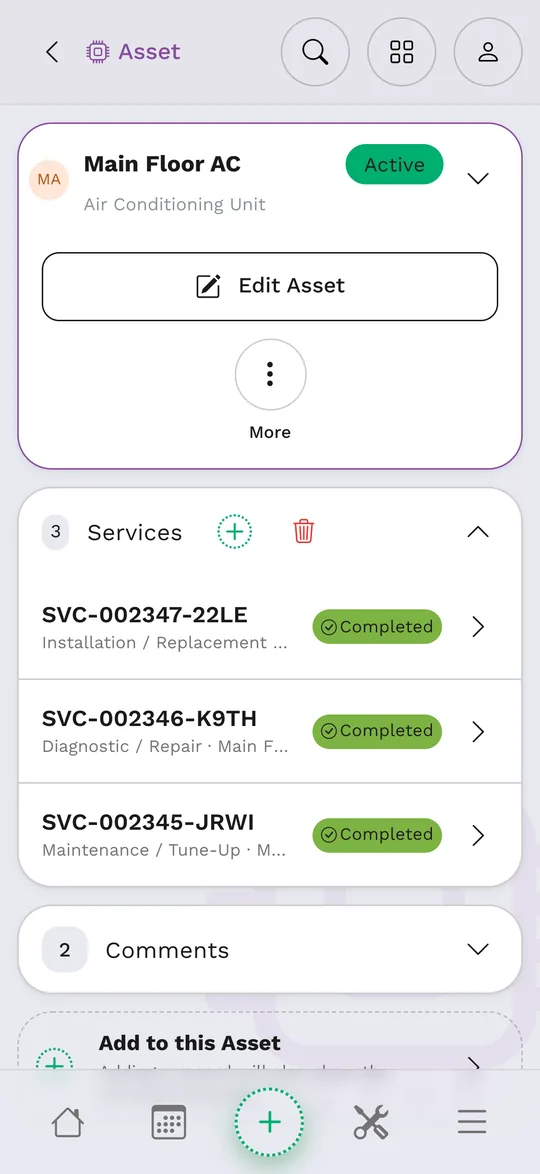
ToolBerry is a customer management app for contractors. Each customer page brings together their sites, contacts, equipment, jobs, estimates and invoices. Save the address, access code and notes for the crew on each site. Pick contacts from your phone's address book, merge duplicates, and see the profit on each customer.
Am Computer? Scanne den QR-Code mit deinem Smartphone, um die App zu erhalten.
Kein Konto und keine Kreditkarte erforderlich. Funktioniert offline.
So funktioniert es
Add the customer
Add a customer, or pick a contact from your phone.
Add their sites
Add a site for each address, with the access code and notes for the crew.
See the history
Open the customer to see every job, estimate and invoice.
Was die App sonst noch kann
- Call, email or get directions with one tap.
- Contacts that belong to more than one customer.
- Download any list as a spreadsheet.
Free, Crew and Pro
Was die einzelnen Tarife enthalten - aus unserer Funktionsliste.
| Funktion | Kostenlos | Team | Pro |
|---|---|---|---|
| Kunden | Included | Änderungen werden innerhalb von Sekunden an das gesamte Team weitergeleitet | Änderungen werden innerhalb von Sekunden an das gesamte Team weitergeleitet |
| Websites | Included | Included | Included |
| Kontakte | Included | Included | Included |
| Duplikate zusammenführen | Included | Included | Included |
| Dokumente in der Sprache des Kunden | Nicht enthalten | Included | Included |
Für Ihre Branche
Verwandte Funktionen
Help articles
Fragen
Can I add my phone contacts?
Yes. Pick someone from your phone's address book on the contact form, and their name, phone and email fill in.
Can I get my data out?
Yes. Download any list as a spreadsheet.
What is a site?
A place you work. One customer can have many sites.
Can I see what a customer is worth?
Yes. The app shows revenue minus labor and expense costs for each customer.
Jeder Kunde, jeder Standort - nur einen Fingertipp entfernt.
Am Computer? Scanne den QR-Code mit deinem Smartphone, um die App zu erhalten.
Kein Konto und keine Kreditkarte erforderlich. Funktioniert offline.