
Hiring Your First Employee: Getting the Business Out of Your Head
The day someone else runs your route, everything you've been carrying in your memory has to live somewhere they can reach.
Updated August 20, 2026
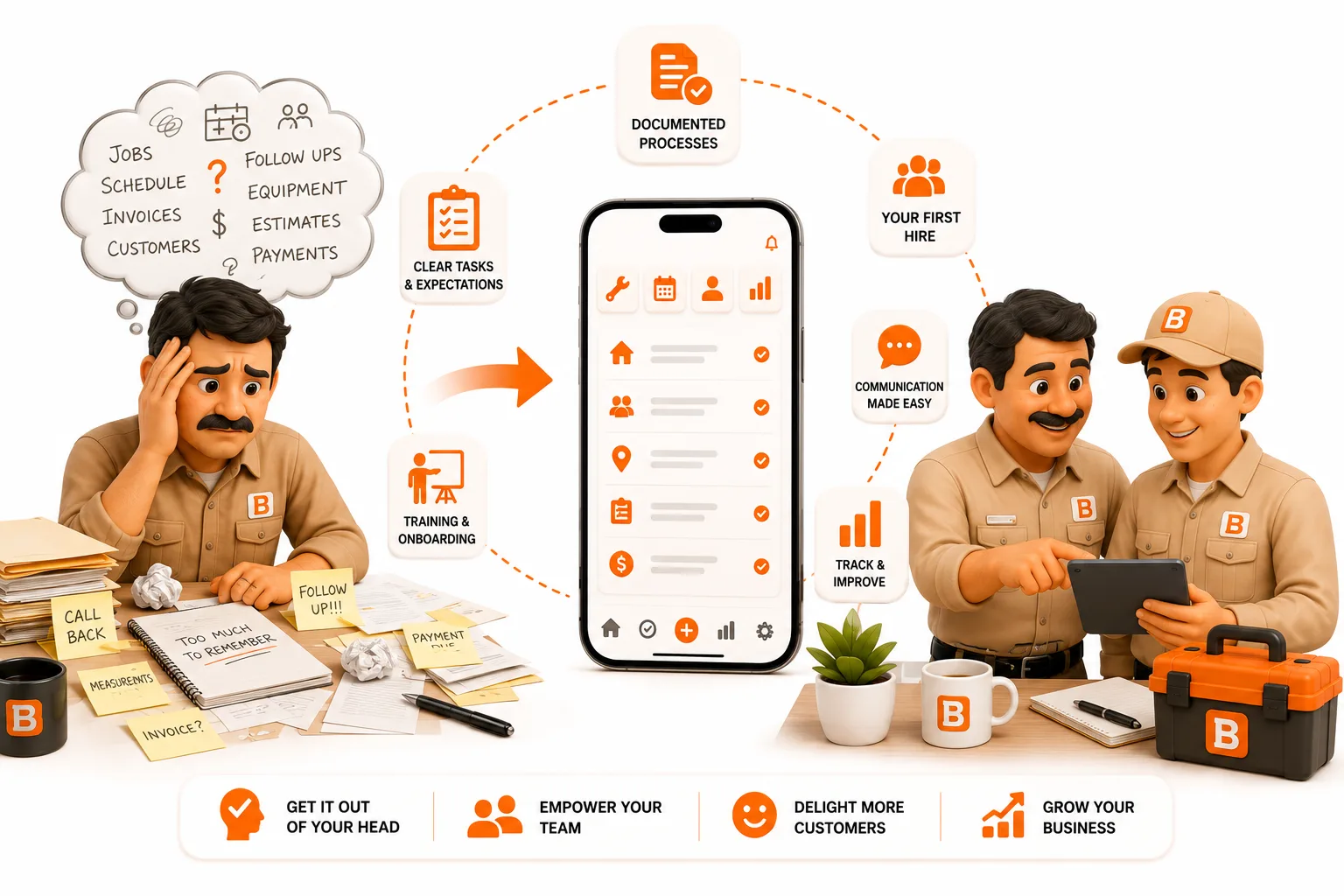
The day someone else runs your route, everything you've been carrying in your memory has to live somewhere they can reach.
Published August 2026.
The short answer
The hardest part of hiring your first employee isn't the paperwork - it's that your business has been running on your memory, and memory doesn't transfer. Before their first solo day, four things have to exist somewhere outside your head: site details (gate codes, pets, where the shutoff is), how each job is actually done, the schedule, and what you charge. ToolBerry is free and holds all four, so a new hire can open a job and see what you'd have told them if you were standing there. Roles and permissions - for the day you don't want a new hire seeing everything - are available in ToolBerry Pro.
You aren't hiring a helper. You're replacing a system.
For as long as you've been solo, you have been the system. You know that the Mendez house needs the side gate because the front latch sticks. You know which customer wants a text before you arrive and which one never answers the phone. You know the Tuesday route by heart, what you charged the Olsons last spring, and which jobs take twice as long as they look.
None of that is written down. It didn't need to be. You were the only one who needed it.
Then you hire someone, and every one of those facts becomes a phone call. They're standing at a gate they can't open. They're asking what to charge. They're calling to ask whether this customer gets the add-on or not. You end up doing your job and narrating theirs - which is why so many first hires feel, for the first month, like more work rather than less.
That's not a bad hire. That's an untransferred system.
The four things that have to leave your head
You don't need to document your whole business. You need these four.
1. Site details
Everything about the property that isn't obvious when you pull up: gate and lockbox codes, where to park, the dog, the tricky shutoff valve, which door to knock on, the neighbor who complains. This is the number one source of new-hire phone calls, and it's the easiest to fix - it belongs on the customer's site record, not in your text history.
2. How the job is actually done
The difference between "clean the gutters" and how you clean the gutters. What's included, what isn't, what the customer has come to expect, the step people forget. A short note on the recurring job beats a training manual nobody reads.
3. The schedule, in a place that isn't you
If the route lives in your head or a notebook in your truck, a second person can't work it without you. Recurring visits have to roll forward on their own, so your hire can look at tomorrow and know where to be.
4. What you charge
Your pricing has probably been intuition plus history. The moment someone else quotes or invoices, intuition isn't available. Your standard prices, and what specific customers pay, have to be visible - or every quote routes through you.
Where ToolBerry fits
All four live in the free app, today:
- Customer and site records with notes - gate codes, parking, pets, access quirks. Add custom fields for whatever your trade needs so it's a real field, not a paragraph someone has to read. (Built to Bend covers that.)
- Work orders with photos and notes - what was done last visit, by whom, with pictures. Your new hire walks into a repeat call already knowing the history.
- Recurring and one-off scheduling - the route rolls forward without you rebuilding it, so tomorrow exists whether or not you're the one looking at it.
- Quotes and invoices from job data - built from the work logged, so pricing isn't a guess.
- Offline - your hire is standing at the gate with no signal. The details load anyway.
- English and Spanish - worth its own paragraph.
The language part
In a lot of trades, your first hire's strongest language isn't English. If the app forces them to work in their second language, they'll use it as little as possible and the information you were trying to capture never gets entered.
ToolBerry runs in English and Spanish on every screen - not a translated help page, the whole app. You can work in one language while your hire works in the other, on the same data. That's the difference between a tool your crew tolerates and one they actually use.
"Should my new hire see everything?"
With one employee you trust, usually the honest answer is: it's fine, and you have bigger things to worry about. ToolBerry Free has no roles - whoever has the app has the data - and for a solo operator plus one, that's often an acceptable trade.
It stops being acceptable pretty quickly, though. Somewhere around your fourth or fifth person - or your first seasonal hire, or the helper who also works for two other companies - you'll want a line between what a field user sees and what only you see. Margins, the full customer book, the ability to delete records.
That's what roles and permissions are for, and they're available in ToolBerry Pro now, including custom roles you define to match your business rather than picking from a fixed "Admin / User" list. The full picture is in Who Can See What.
You don't need that on day one of your first hire. You'll know when you do.
A realistic first two weeks
- Before they start: enter your 10 most-visited customers with real site notes - codes, parking, pets, quirks. Not all of them. The ten that matter.
- Put the recurring route in so next week exists in the app, not just in your head.
- Ride along for the first few days and add the note every time you say "oh, and here you have to…" That sentence is the documentation. Capture it as you say it.
- Let them log the work orders, including photos. This is the habit that matters most - it's how the business starts remembering things without you.
- First solo day: they open the app instead of calling you. Count the calls. That number is your progress metric.
Aim for a month, not a weekend. The goal isn't a perfect system - it's fewer phone calls each week.
The honest tradeoffs
This is the operations half of hiring, not the legal half. Payroll, tax withholding, workers' comp, employment classification, and what your state requires are real and consequential, and ToolBerry doesn't handle any of them. Talk to an accountant or an employment attorney before your first hire starts - we're engineers, not your advisors on that.
ToolBerry isn't payroll or time-tracking software. It holds your customers, jobs, schedule, and history. It won't run paychecks.
Roles require Pro. On Free, the app is account-less by design, which is exactly why it can't enforce permissions. If you need that boundary, that's the Pro line.
Real-time sync across devices is still coming. On Free you sync and back up through your own Dropbox, which is periodic rather than instant. If you need your hire's phone and your office to update live, that's in development - tell us what you need.
Have a question?
We build ToolBerry as working engineers, and the jump from solo to two people is one we hear about constantly. Tell us what your first hire kept calling you about at contact@toolberry.net - it's the most useful feedback we get.
Grab ToolBerry from the App Store or Google Play, or visit toolberry.net.
Free forever for solo operators. No account. No credit card. Works offline.
Further reading
- Who Can See What: Roles and Permissions for a Growing Service Business - the next step after your first hire
- Free vs Pro: The ToolBerry Story, and What Each Plan Is For - what changes as you grow
- How ToolBerry Helps Landscapers Run Their Business - the same story, one trade deep
- Built to Bend: Why ToolBerry Lets You Customize Everything - making the fields match your trade